Choose Aqtos if
You want the business together.
You want a clear place for each business workflow and would rather spend less time deciding how to structure spaces, fields and internal processes.
Aqtos vs ClickUp
Spend your attention on the business. Aqtos BOSS gives projects, clients, people and money a home from the start, with everyday workflows already defined.
14 days free. Card required.
$199/month after your trial. Unlimited people.

The short answer
Aqtos is a ClickUp alternative for teams that prefer a ready-to-use business workspace over designing a highly customized work system. Start with projects, then connect time tracking, CRM, HR, invoices and expenses as you need them.
Choose Aqtos if
You want a clear place for each business workflow and would rather spend less time deciding how to structure spaces, fields and internal processes.
ClickUp may fit if
Deep customization is a priority and someone on your team enjoys building and maintaining the workspace. ClickUp offers templates, a configurable hierarchy and extensive work-management features.
Why teams consider Aqtos
Projects, clients, employee records and financial operations have defined homes in Aqtos. Invite the people you work with and start from a real project, with settings that can follow your company’s needs.
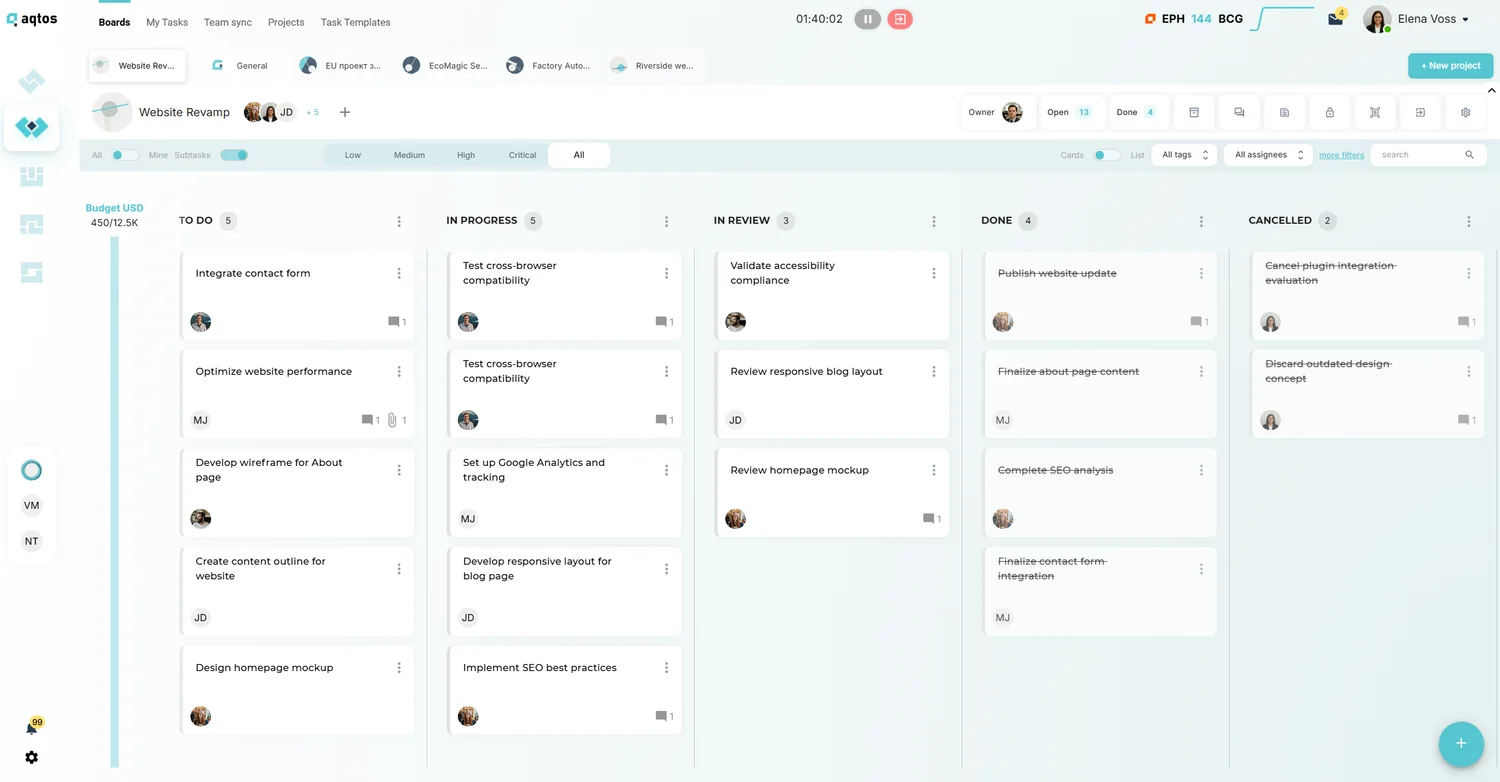
See the workspaceUse tasks, project budgets and time tracking together. Keep delivery close to the client and financial records, so the team can follow the work without reconstructing its context.
Explore project workflowsHandle leave requests, employee information, invoices and expenses through their own business modules. These are recurring parts of running a company, with a place in the same system as delivery.
Explore HR and leaveSide by side
Look at the complete workflow, the plan it requires and the tools you would still keep.
| Your workflow | Aqtos BOSSWork, people and money together | ClickUpCapabilities and considerations |
|---|---|---|
| Workspace approach | Defined modules for projects, CRM, people and money. | Configurable Workspace, Spaces, Folders and Lists, plus templates. [1] |
| Project management | Projects, tasks, boards, estimates and budgets. | Tasks, boards, Gantt, goals and other views; availability depends on the plan. [2] |
| Time tracking | Task and project time tracking in BOSS. | Native time tracking is included in paid plans such as Unlimited. [2] |
| People & HR | Employee profiles, leave and recruitment workflows. | Flexible work structures can support HR processes; assess how you want employee data and leave handled. [1] |
| Invoices & expenses | Invoicing and expense management alongside work and clients. | Configure workflows and integrations to suit the financial processes you need. [1] |
| How you pay | $199/month for unlimited people on the monthly Pro plan. | Free and paid plans; paid tiers are priced per member, with plan-specific capabilities. [2] |
Competitor details checked September 6, 2026. Features and plans can change. See official sources. Aqtos is the publisher of this comparison.
Take a look around
Follow a project, check its time and costs, look up a client and find who is away. Use your own day-to-day work to decide whether the system fits.
Explore the product tourSwitching from ClickUp
A simpler workspace starts with deciding what is essential. Pick one active ClickUp project and test how the work feels in Aqtos before planning a wider move.
Talk through your moveChoose the tasks, owners, statuses and deadlines the team genuinely uses. Decide which custom fields and automations are essential to preserve.
Share a sample export with the Aqtos team and confirm the supported import route. Check field mapping and any attachments or comments before moving the full project.
Invite your team, review permissions and define relevant approval or leave policies. Begin with project delivery and add the other modules when they are useful.
A sample migration is the best way to confirm what will transfer. Keep original records until your team has checked the result.
One subscription. Your whole team.
Projects, CRM, HR, time tracking, invoicing and expenses in BOSS.
Compare the total software you need, including tools you would keep. The least expensive option depends on your team size and requirements.
Aqtos starts with defined modules for projects, CRM, HR and finances. This can suit teams that want common business workflows ready to use. Simplicity is a fit decision: test your own project in the trial.
You start with a structured business workspace, but still need to invite people and review settings such as permissions, leave policies and approval rules. The benefit is a defined starting point for those workflows.
Yes. ClickUp offers templates and native time tracking on eligible paid plans. Aqtos is worth considering when your priority is bringing business administration and delivery into a more predefined workspace.
Confirm the current migration route and field support with the Aqtos team before making that assumption. Use a sample export and test any critical automations or approval processes separately.
The Aqtos monthly Pro plan is $199 for unlimited people, after a 14-day trial with a credit card required. Compare the total workflows and subscriptions your team needs, alongside the number of paid seats.
Try Aqtos with a real project
Bring your team, try the workflows and see whether it feels right.
14 days free. Card required. $199/month after your trial.